How I Saved ~77% Docker Memory by Migrating MySQL to MariaDB

This is not a benchmark and not a recommendation for high-traffic workloads. All numbers here are real observations from a low-resource VPS running Ghost CMS.
I’m running Ghost CMS on a very small VPS: 1 vCPU, 2 GB RAM, zero swap because it’s OpenVZ. At some point the server was already sitting at around 1.75 GB RAM usage, and I still needed to host another PHP + MariaDB app for a college assignment. So yeah, memory was getting dangerously tight.
To understand what was eating my RAM, I checked the system using ps aux --sort=-%mem | head and docker stats. One process immediately stood out:
30215 0.4 19.7 1304564 404200 ? Ssl 01:45 0:05 mysqld
Docker confirmed it. The Ghost MySQL container alone was consuming more than 400 MB of memory, roughly 20% of my total RAM.
NAME          CPU %   MEM USAGE / LIMIT      MEM %
ghost-cms     0.03%   168.8 MiB / 1.953 GiB  8.44%
ghost-mysql   0.41%   405.0 MiB / 1.953 GiB  20.25%
For a personal blog, this was ridiculous. I don’t care about database performance here. This is not a high-traffic production system. It’s just Ghost.
So the goal was very simple: make the Ghost database container use as little memory as possible.
After some research, I realized that there is no official Alpine-based image for either MySQL or MariaDB. Both projects no longer publish Alpine variants on Docker Hub, so using an ultra-minimal base image was not an option here.
Instead, I started comparing the available MariaDB tags directly on Docker Hub, focusing on compressed image size as a rough indicator of baseline resource usage. After scrolling through the tags, I found mariadb:10.6.24-jammy, which stood out as one of the smallest stable options, with a compressed size of 98.45 MB. For comparison, the commonly used mariadb:10.6.24-ubi9 image weighs around 153.7 MB, which is significantly larger.
The migration itself was intentionally simple. No Kubernetes, no replicas, no fancy stuff — just plain Docker. The downtime was around one minute, and it actually happened, not an estimate. I prepared the new database container first, completed the data import, and only then updated Ghost’s database configuration to point to the new MariaDB instance. Once the Ghost container was restarted, the site was back online almost immediately.
First, this was my original Docker Compose setup using MySQL:
version: "3.9"

services:
  ghost:
    image: ghost:6.10.3-alpine3.23
    container_name: ghost-cms
    restart: always
    ports:
      - 8088:2368
    environment:
      database__client: mysql
      database__connection__host: db
      database__connection__user: ${MYSQL_USER}
      database__connection__password: ${MYSQL_PASSWORD}
      database__connection__database: ${MYSQL_DATABASE}
      url: ${GHOST_URL}
    volumes:
      - ghost:/var/lib/ghost/content
    depends_on:
      - db

  db:
    image: mysql:8.0-bookworm
    container_name: ghost-mysql
    restart: always
    environment:
      MYSQL_ROOT_PASSWORD: ${MYSQL_ROOT_PASSWORD}
      MYSQL_DATABASE: ${MYSQL_DATABASE}
      MYSQL_USER: ${MYSQL_USER}
      MYSQL_PASSWORD: ${MYSQL_PASSWORD}
    volumes:
      - db:/var/lib/mysql

volumes:
  ghost:
  db:
The first step was adding a new MariaDB service without touching the existing MySQL container, so rollback was always possible.
mariadb:
  image: mariadb:10.6.24-jammy
  container_name: ghost-mariadb
  restart: always
  environment:
    MARIADB_ROOT_PASSWORD: ${MYSQL_ROOT_PASSWORD}
    MARIADB_DATABASE: ${MYSQL_DATABASE}
    MARIADB_USER: ${MYSQL_USER}
    MARIADB_PASSWORD: ${MYSQL_PASSWORD}
  volumes:
    - mariadb:/var/lib/mysql
    - ./my.cnf:/etc/mysql/conf.d/my.cnf:ro
Before migrating anything, I exported the database from the old MySQL container. I already had a daily backup script, so I reused it:
#!/bin/bash

DATE=$(date +%F_%H-%M)
DIR=/root/ghost/db-backups

docker exec ghost-mysql \
  mysqldump -u root -p'PASSWORD' ghost \
  > ${DIR}/ghost-${DATE}.sql
Because my VPS only has 2 GB RAM and I genuinely don’t care about database performance, I aggressively tuned MariaDB memory usage using a custom my.cnf:
[mariadb]
character-set-server = utf8mb4
collation-server = utf8mb4_unicode_ci

innodb_buffer_pool_size=64M
innodb_log_buffer_size=8M
max_connections=20
performance_schema=OFF
skip-name-resolve
Yes, 64 MB buffer pool. And yes, it’s perfectly fine for a blog.
When importing the SQL dump into MariaDB, the first error I hit was:
ERROR 1046 (3D000): No database selected
That happened because the dump didn’t include a USE ghost; statement. The fix was simply specifying the database explicitly:
docker exec -i ghost-mariadb \
  mysql -u root -pPASSWORD ghost \
  < ghost-2026-01-07_00-00.sql
Immediately after that, another error appeared:
ERROR 1273 (HY000): Unknown collation 'utf8mb4_unicode_ci'
This was expected. MySQL 8 uses utf8mb4_unicode_ci, which MariaDB does not support. I fixed it by replacing the collation inside the SQL file:
sed -i \
  's/utf8mb4_unicode_ci/utf8mb4_unicode_ci/g' \
  ghost-2026-01-07_00-00.sql
Because the import had already failed halfway, I dropped and recreated the database to start clean:
docker exec -it ghost-mariadb \
  mysql -u root -pPASSWORD \
  -e "DROP DATABASE ghost; CREATE DATABASE ghost CHARACTER SET utf8mb4 COLLATE utf8mb4_unicode_ci;"
Then I re-imported the SQL dump:
docker exec -i ghost-mariadb \
  mysql -u root -pPASSWORD ghost \
  < ghost-2026-01-07_00-00.sql
Once the database was successfully imported, the last step was pointing Ghost to the new MariaDB container. I changed this line in docker-compose.yml:
database__connection__host: db
to:
database__connection__host: mariadb
After restarting Ghost, the site loaded perfectly with no issues. Only after confirming everything was stable did I delete the old MySQL container and volume.
Here’s the final Docker Compose setup:
version: "3.9"

services:
  ghost:
    image: ghost:6.10.3-alpine3.23
    container_name: ghost-cms
    restart: always
    ports:
      - 8088:2368
    environment:
      database__client: mysql
      database__connection__host: mariadb
      database__connection__user: ${MYSQL_USER}
      database__connection__password: ${MYSQL_PASSWORD}
      database__connection__database: ${MYSQL_DATABASE}
      url: ${GHOST_URL}
    volumes:
      - ghost:/var/lib/ghost/content
    depends_on:
      - mariadb

  mariadb:
    image: mariadb:10.6.24-jammy
    container_name: ghost-mariadb
    restart: always
    environment:
      MARIADB_ROOT_PASSWORD: ${MYSQL_ROOT_PASSWORD}
      MARIADB_DATABASE: ${MYSQL_DATABASE}
      MARIADB_USER: ${MYSQL_USER}
      MARIADB_PASSWORD: ${MYSQL_PASSWORD}
    volumes:
      - mariadb:/var/lib/mysql
      - ./my.cnf:/etc/mysql/conf.d/my.cnf:ro

volumes:
  ghost:
  mariadb:
The result was honestly better than I expected. The MariaDB container now sits at around 93 MB of RAM, while Ghost itself uses around 167 MB.
NAME            CPU %   MEM USAGE / LIMIT      MEM %
ghost-cms       0.01%   167.8 MiB / 1.953 GiB  8.39%
ghost-mariadb   0.01%   93.21MiB  / 1.953 GiB  4.66%
Compared to the original ~405 MB MySQL usage, that’s roughly an 77% reduction in database memory usage, achieved purely by switching to MariaDB and tuning it aggressively.
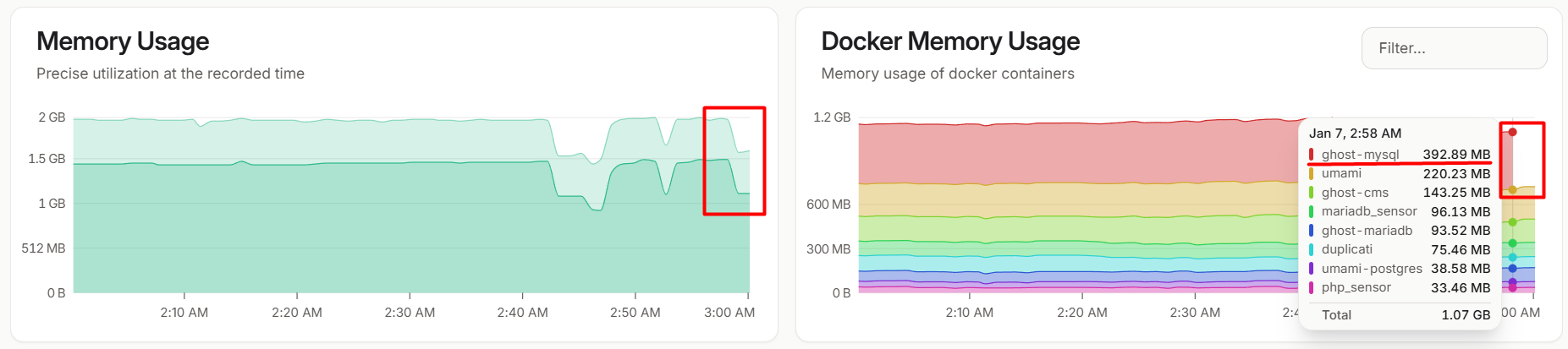
Finally, the impact was also clearly visible from my monitoring system. Right after the ghost-mysql container was stopped, there was a sharp and immediate drop in overall RAM usage, with the memory graph showing a steep decline that confirmed MySQL as the biggest memory consumer on this VPS. There are no benchmarks and no performance claims here — this setup isn’t designed for high-traffic workloads, and that’s completely fine. The only goal was to keep Ghost running comfortably on a tiny VPS, and for that purpose, it worked perfectly.